
Building a Financing Intake Agent with SOP Workflows
March 16, 2026 · Reedy Team
How we use a three-step, template-driven workflow to classify, extract, and validate loan application documents.
Financing and loan applications often start the same way: a folder full of PDFs, emails, and statements that someone has to read, understand, and reconcile. The information is there, but turning it into a consistent, auditable view of the applicant takes time and attention from people who should be focusing on decisions rather than extraction. Automating the loan intake process with an AI agent allows teams to reclaim that time and keep the focus on underwriting and decisions.
In this post, we walk through how we built that financing intake agent that helps with this first mile of the process. The agent reads a bundle of applicant documents, classifies each file, extracts the relevant fields, and runs basic validation and aggregation logic to produce a structured report. Everything is driven by a single template, so the workflow is transparent and easy to adapt to new standard operating procedures (SOPs).
We will focus on the design of the workflow, the structure of the template, and the kinds of checks the agent performs, staying at a level that is useful for your business working on similar problems.

Use case
The starting point is a simple idea:
Have an agent that assists with loan and financing intake. The agent should classify each uploaded document into a known category, extract the fields we care about for each category, and validate that the bundle of documents is recent, consistent, and complete enough for a preliminary view of the applicant.
For this first version, we focused on a common set of document types:
- Government ID
- W-2 forms (or similar)
- Pay stubs
- Bank statements
- Investment account statements
The agent's job is to:
- Associate every file with exactly one of these types.
- Extract type-specific fields (for example, balances or wages).
- Combine the extracted data into an applicant-level view.
- Run a small set of validation checks and basic aggregations.
All of this is encoded in a template that our workflow engine can execute.
The template-based workflow
At the center of the system is a JSON template that describes the entire workflow. It specifies:
- High-level metadata about the workflow.
- How tasks are executed.
- The extraction tasks themselves.
- How the final report is assembled.
Each extraction task is backed by an AI agent with its own configuration: role, instructions, input sources, and output schema. The template controls these settings so that, over time, different tasks can use different models or configurations where that makes sense, even though the current version runs on a single model for all three steps.
Here is a simplified view of the top-level structure:
{
  "name": "Loan Application – Classify, Extract, Validate",
  "document_type": "loan_application",
  "version": "1.0.0",
  "agentic_mode": "strict",
  "workflow_config": {
    "execution_mode": "parallel",
    "max_parallel_extractions": 3,
    "retry_failed_extractions": true,
    "max_retries": 2,
    "continue_on_partial_failure": true
  },
  "extraction_tasks": [
    { "task_id": "classify_document",   "depends_on": [] },
    { "task_id": "extract_by_schema",   "depends_on": ["classify_document"] },
    { "task_id": "validate_applicant",  "depends_on": ["extract_by_schema"] }
  ],
  "report_config": {
    "format": "json",
    "sections": [
      { "section_id": "combined", "uses_extractions": ["all"] }
    ]
  }
}
The three tasks form a small DAG: classification first, then schema-based extraction, then validation. Intermediate results flow between tasks through named variables, so the behavior is easy to reason about and trace.
The diagram below summarizes how Reedy orchestrates this process end to end.
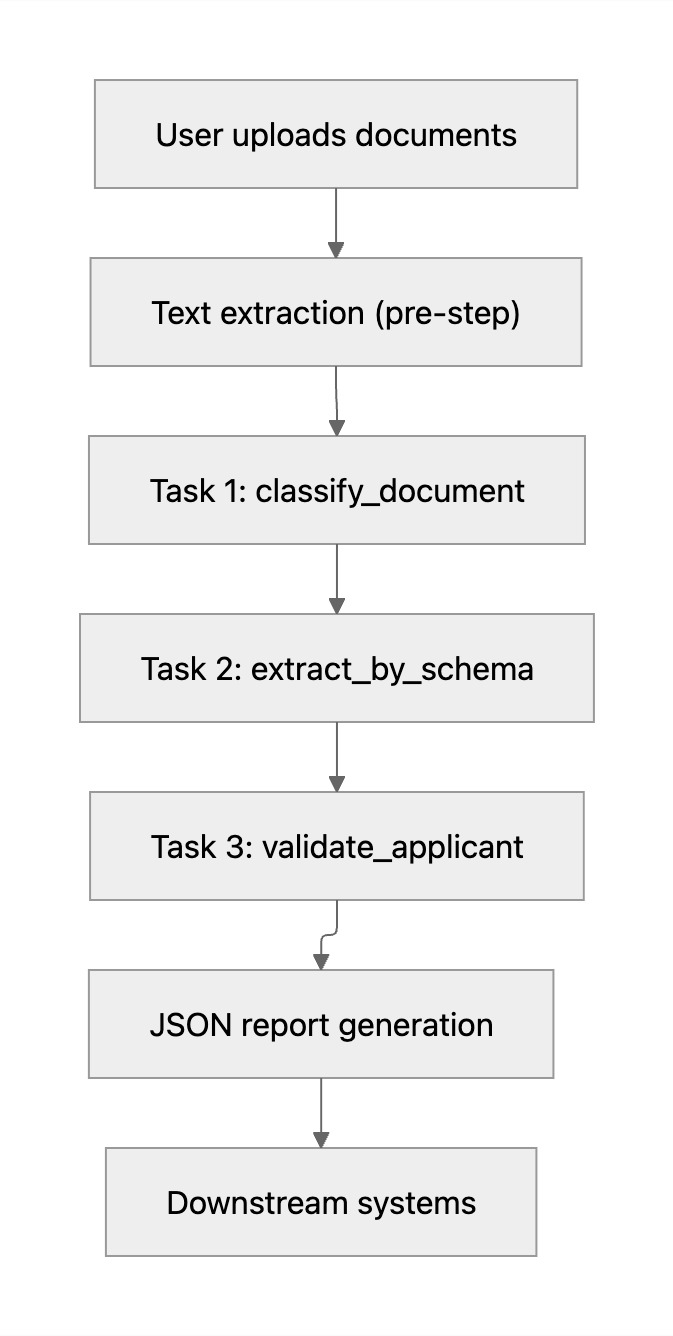
Reedy's workflow engine uses this template to coordinate the steps reliably, so the same pattern can be reused and extended for other financing SOPs.
Step 1 - Classifying documents
The first task operates at the level of whole documents. Its goal is to assign each uploaded file a single document type from a small, closed set:
IDW2pay_stubbank_statementinvestment_statement
In the template, this task exposes a small, explicit output schema:
{
  "task_id": "classify_document",
  "name": "Classify document type",
  "output_config": { "var_name": "document_types" },
  "agent_config": {
    "agent_type": "document_extraction",
    "output_schema": {
      "type": "array",
      "items": {
        "type": "object",
        "properties": {
          "document_index": { "type": "integer" },
          "document_type": {
            "type": "string",
            "enum": ["ID", "W2", "pay_stub", "bank_statement", "investment_statement"]
          }
        },
        "required": ["document_index", "document_type"]
      }
    }
  }
}
The agent receives the extracted text grouped by document and returns an array of { document_index, document_type } pairs, which is then passed into the next step.
Step 2 - Schema-based extraction
Once each file has a type, the workflow moves to field extraction. This second task uses the classification output to decide what to extract from each document. The schema is defined in the template so that both the agent and downstream systems agree on structure and naming.
In the template, the output schema for this step stays compact and generic:
{
  "type": "array",
  "items": {
    "type": "object",
    "properties": {
      "document_index": { "type": "integer" },
      "document_type": { "type": "string" },
      "fields": {
        "type": "object",
        "description": "Type-specific fields (names, amounts, dates, etc.)"
      }
    },
    "required": ["document_index", "document_type", "fields"]
  }
}
The exact field set is defined per document type in the prompts and internal SOPs. The template enforces that amounts and years are treated as numbers where appropriate, while names and dates remain strings.
Step 3 - Validation and aggregation
The third task works purely on structured data. Instead of reading document text again, it consumes the array of extractions and produces a compact summary of the applicant's situation.
The task performs three main jobs:
- Name consistency: Collect all name-like fields across documents (for example,
account_owner,employee_name,name) and check that they refer to the same person. - Recency: Check that key documents refer to recent years or dates within the acceptable window defined by internal policy.
- Assets aggregation: Sum balances from bank and investment statements into a single
total_assetsfigure.
The detailed thresholds and rules behind these checks are encoded in internal SOPs and can evolve independently of the template structure.
Report generation
The final part of the template describes how to combine all task outputs into a single report. The configuration for this is concise:
This produces a JSON payload that contains the list of documents with their assigned types, the field-level extractions for each document, the validation summary and aggregated assets, and a short narrative block derived from these values. Because the report is still structured JSON, it can be consumed directly by downstream systems: scoring engines, dashboards, or case management tools.
Execution and behavior
The workflow engine uses the workflow_config and depends_on graph to orchestrate the agent:
- The three extraction tasks run in a constrained parallel mode, with retries configured for robustness.
- If some documents fail to extract on the first attempt, the engine retries up to the configured limit.
- The workflow can continue on partial failure, as long as enough information is available to produce a meaningful preliminary report.
The execution order is simple:
- Run
classify_documentacross all documents. - Run
extract_by_schemaonce, using both the texts and the classification results. - Run
validate_applicantonce, using only the structured extractions from the previous step. - Generate the report section by combining all task outputs into a single JSON object.
This design keeps each task focused and makes it straightforward to add new tasks or adjust existing ones as SOPs evolve.
Lessons learned
Building this agent highlighted a few patterns that have been useful:
- Start from the schema: Defining the desired JSON structure first clarifies what the agent should do and how downstream systems will use it.
- Separate concerns: Keeping classification, extraction, and validation as distinct tasks improves traceability and makes it easier to debug edge cases.
- Limit the surface area: Working with a small, explicit set of document types and fields reduces ambiguity and helps the agent stay within well-defined boundaries.
- Treat templates as code: Versioning the template file and aligning it with written SOPs keeps behavior consistent across environments and over time.
These principles generalize to other financing workflows, such as more detailed corporate intake processes or multi-phase evaluations. In Reedy, the same template-based approach can be extended to new document types, additional checks, and richer reporting without redesigning the core engine.
What's next?
Many teams still depend on manual steps to move from documents to decisions. People copy values from PDFs into systems, keep spreadsheets of rules, and maintain scripts that are hard to extend when products or policies change.
The workflow described here is one example of how Reedy is designed to take over that operational layer.
You bring:
- The documents that matter for your products,
- The decisions you need to support,
- The business rules and SOPs you already trust.
Reedy brings:
- Ingestion and storage for your document bundles,
- AI-powered extraction and analysis,
- Template-driven workflows and configurable agents,
- Search, citations, and observability,
- Controls to keep credits and costs predictable.
Together, these pieces help you move from unstructured document noise to structured signals that can feed underwriting, monitoring, and internal reporting consistently and at scale.
Ready to see it in action?
Run your first workflow on real documents, or talk to our team about how Reedy Paral·lel can fit into your existing stack and processes.
Book an Intro at usereedy.com to see Reedy Paral·lel in action and deploy it in your operations.